
Collecting customer feedback about your store, products, and shipping experience is critical to continuously improving the shopping experience—especially for new stores. One effective way to encourage visitors to share feedback is to reward them with a discount code after they submit a feedback form.
With Simply Forms and Shopify Flow, you can easily implement a secure, automated workflow that meets the following requirements:
What This Setup Supports
✅ Show a discount code after a visitor submits a feedback form — whether they are logged in or not
✅ Ensure the discount code can only be used by customers who have submitted feedback
✅ Limit the discount to one use per customer
How It Works with Simply Forms + Shopify Flow
Step 1: Create a Feedback Form
Create a Feedback Form using the Simply Forms app.
After the form is submitted, display a success message that includes a discount code (or instructions on how to use it) like below.
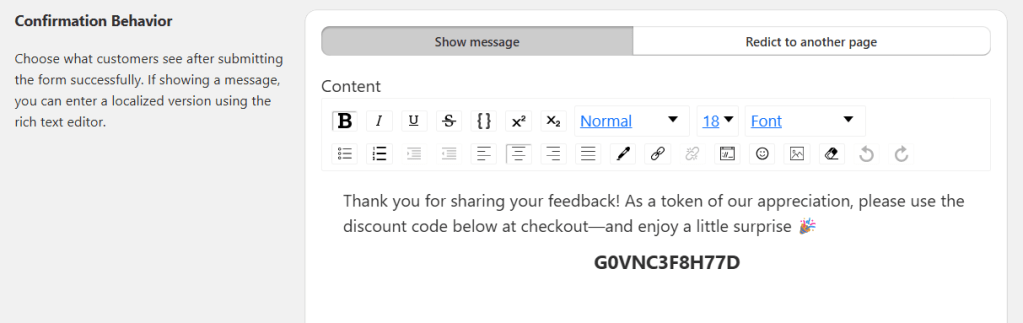
💡 Tip: The success message is a great place to thank customers and explain how the discount can be redeemed.
Step 2: Create a Shopify Flow Workflow
Use Shopify Flow to automatically tag customers who submit a feedback form.
Workflow Setup
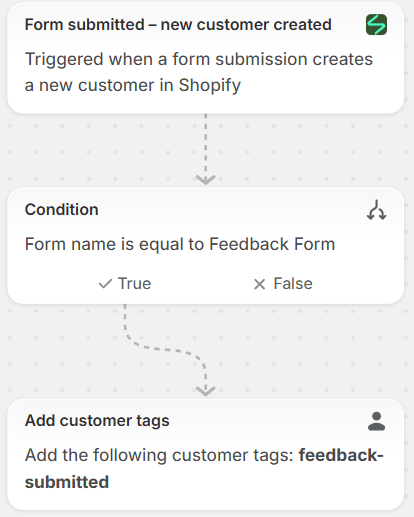
- Trigger the workflow when a customer submits the Feedback Form
- Action: Add a customer tag, for example:
feedback-submitted
This customer tag is used later to control who is eligible to redeem the discount code.
Workflow Examples
The diagram below shows the workflow for a new customer who submits the feedback form:
If the feedback is submitted by an existing customer, create a similar workflow to ensure the same feedback-submitted tag is applied:
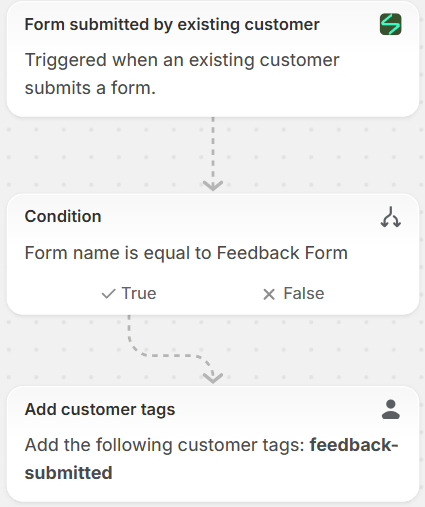
By covering both new and existing customers, you ensure that all feedback submissions are consistently tracked and rewarded 🎯
Step 3: Create a Customer Segment
In Shopify Admin, create a customer segment that includes customers tagged with feedback-submitted.
This segment updates automatically as more customers submit feedback, ensuring eligibility is always kept up to date.
Option 1: Use Shopify’s AI Assistant
You can use Shopify’s built-in AI to create the segment by entering the following prompt:“Create a segment of customers with the feedback-submitted tag.”
Shopify will generate the segment for you automatically.
Option 2: Create the Segment Manually
Alternatively, you can create the segment manually using the following query:
FROM customers
SHOW customer_name, note, email_subscription_status, location, orders, amount_spent, email
WHERE customer_tags CONTAINS 'feedback-submitted'
ORDER BY updated_at
Once saved, this segment can be used to restrict discount codes so that only customers who have submitted feedback are eligible to redeem them.
Step 4: Create a Discount Code
Create a discount code in Shopify Admin with the following settings:
- Apply the discount only to the customer segment created in Step 3
- Limit the discount to one use per customer
These settings ensure that the discount can only be redeemed by customers who have submitted feedback—and only once.
Once the discount code is created, copy it into the success message of the Feedback Form you set up in Step 1, so customers can see and use the reward immediately after submitting their feedback.
Result
With this setup:
- Visitors are incentivized to provide valuable feedback
- Discounts are securely restricted to eligible customers
- Everything runs automatically with Simply Forms + Shopify Flow
This is a powerful way to increase engagement, gather insights, and reward customers—all without manual effort.
You can also apply the same setup to other types of forms, such as Contact Us, Survey, Bulk Order, or any custom form where you want to encourage submissions and control incentives in a reliable, automated way.
 Silverpineint Simply Forms